- JavaScript 53%
- PHP 29%
- Vue 17.9%
 834d396ffd
Final release artefacts:
- CHANGELOG.md: 1.6.0 entry rewritten to fold in PhotoStory lightbox
  fixes (originally drafted for a never-released 1.5.6), NC34 audit
  results, and the POT tool switch — all of which landed during the
  same dev cycle.
- openapi.json: bumped to 1.6.0 (was lagging on 1.5.5).
- l10n/: regenerated via `npm run l10n` with the new plural-form
  overrides path active. POT regenerated via NC's translationtool.phar.
- js/: production build. Old chunk hashes pruned, new ones emitted.

All RELEASE_CHECKLIST.md sections 0-6 passed:
- §0 signing key present, RSA-valid, not in git
- §1 zero debug logs, zero hardcoded creds, zero sensitive files, npm
     audit clean
- §1b @nextcloud/vue 9.8.1 ≥ NC34's 9.8.x
- §2 4 bundled langs (en 1258, nl 1235, de 1234, fr 1234), POT 442
     msgids, msgfmt-clean, no bot PRs to reconcile yet
- §3 versions sync (package.json 1.6.0, info.xml 1.6.0, openapi 1.6.0)
- §4 openapi.json valid JSON
- §5 production build OK (only TipTap bundle-size warnings, expected)
- §6 NC32-34 declared, PHP 8.2+ matches composer.json

Co-Authored-By: Claude Opus 4.7 <noreply@anthropic.com>
|
||
|---|---|---|
| .gitea/workflows | ||
| .tx | ||
| appinfo | ||
| css | ||
| demo-data | ||
| docs | ||
| img | ||
| js | ||
| l10n | ||
| lib | ||
| screenshots | ||
| scripts | ||
| showcases | ||
| src | ||
| templates | ||
| tests | ||
| translationfiles/templates | ||
| .gitattributes | ||
| .gitignore | ||
| .l10nignore | ||
| CHANGELOG.md | ||
| composer.json | ||
| composer.lock | ||
| intravox-0.8.4.tar.gz.sig | ||
| LICENSE | ||
| openapi.json | ||
| package-lock.json | ||
| package.json | ||
| phpunit.xml | ||
| README.md | ||
| RELEASE_CHECKLIST.md | ||
| webpack.config.js | ||
IntraVox - Intranet Pages for Nextcloud
Build collaborative intranet pages directly in Nextcloud with a powerful drag-and-drop editor.
IntraVox brings SharePoint-style page creation to Nextcloud, enabling teams to build intranets, knowledge bases, and collaborative workspaces within their secure Nextcloud environment.

See IntraVox in action: drag-and-drop editing, navigation, and responsive design
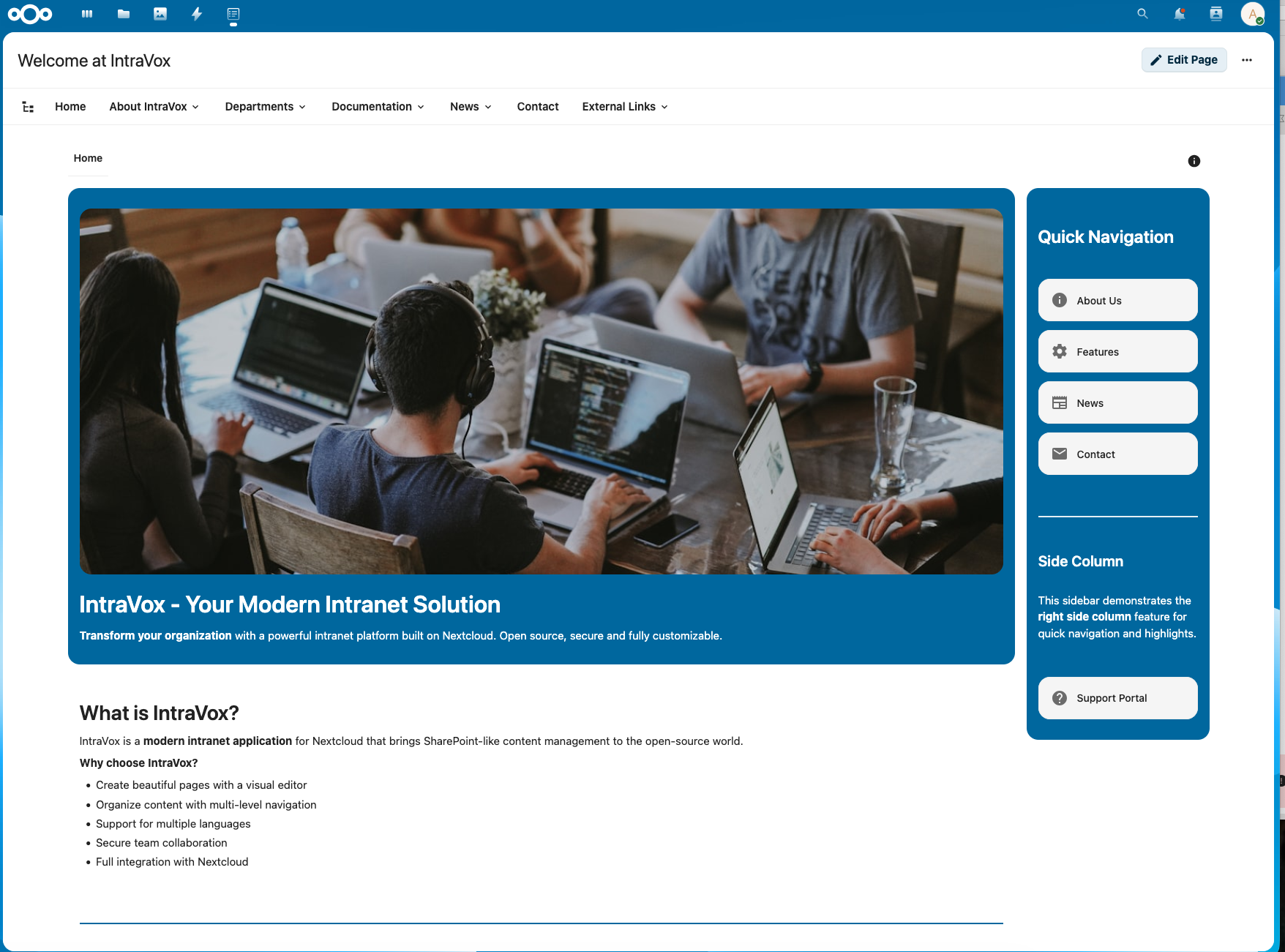
Professional pages with drag-and-drop editing and smart navigation
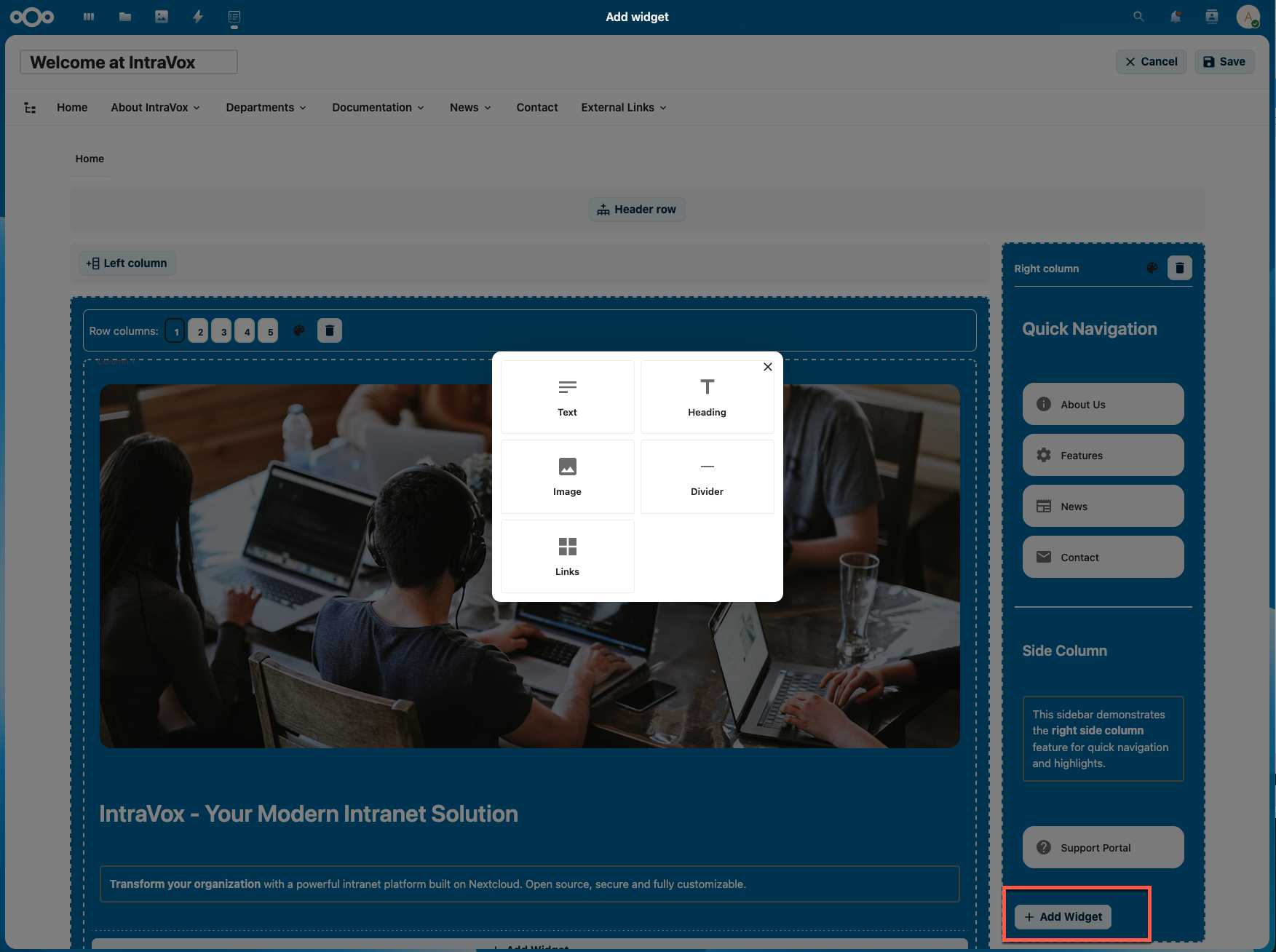
Visual editor with flexible layouts and intuitive widget management
Responsive design across desktop, tablet, and mobile
Features
Page Editor
- Visual Drag-and-Drop Editor - Create pages without coding. Drag widgets where you need them
- Flexible Grid System - Build layouts with 1-5 columns per row
- Row Background Colors - Theme-aware colors that adapt to your Nextcloud theme
- Duplicate Rows - Copy a complete row with all columns and widgets in one click
- Header Row - Full-width header section above the main content
- Side Columns - Optional left and/or right side columns for additional content
- Unlimited Rows - Add as many content rows as needed
- Sticky Toolbar - Save/Cancel buttons stay visible when scrolling long pages
- Page Locking - Prevents concurrent edits with automatic lock expiry and admin override
- Draft/Published Status - Prepare pages as draft before publishing to readers
Available Widgets
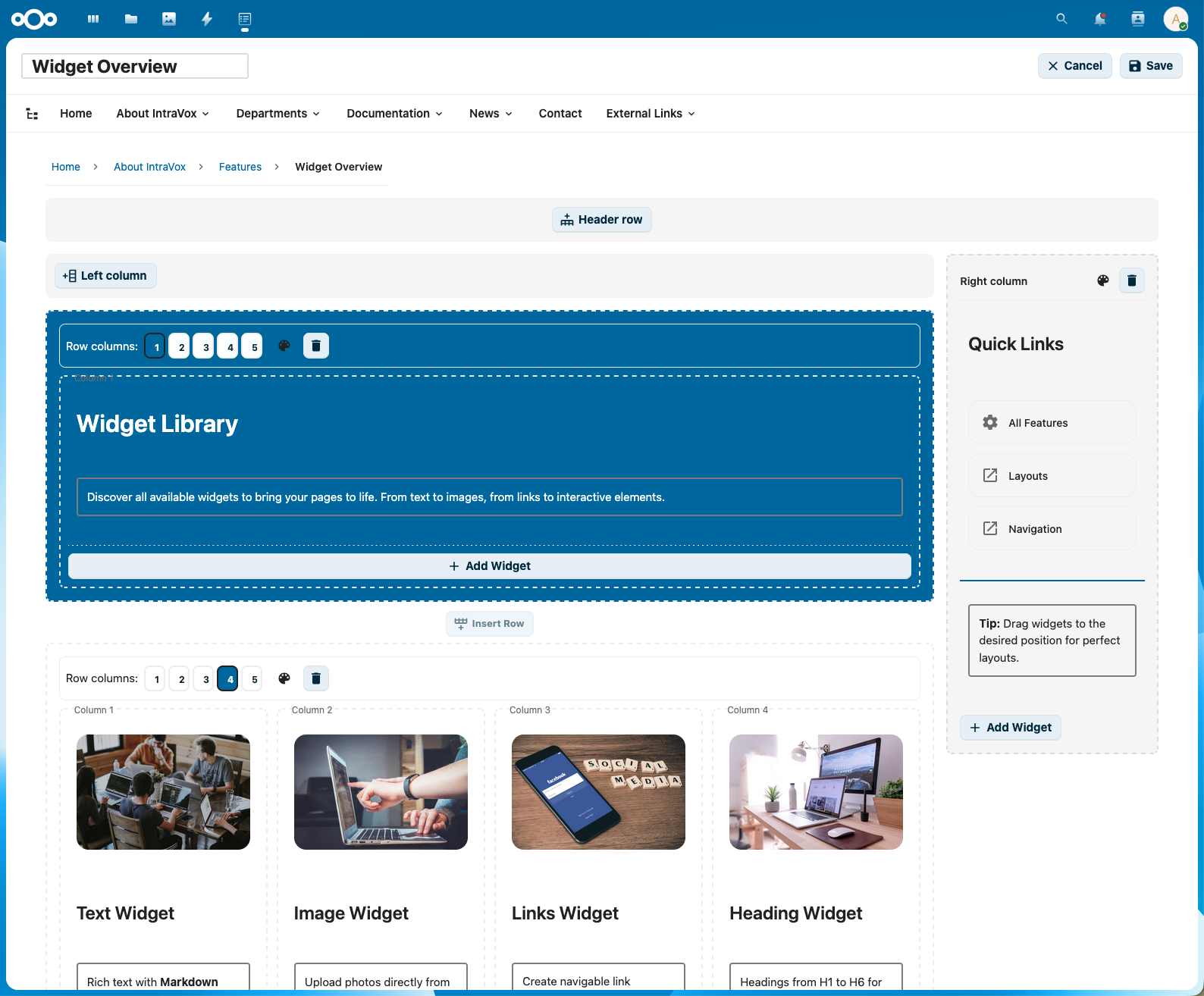
Widget palette with all available content types
| Widget | Description |
|---|---|
| Text | Rich text with full Markdown support (bold, italic, lists, links, tables) and a built-in dummy text generator |
| Heading | H1-H6 headers with customizable styling |
| Image | Visual content with flexible sizing, optional clickable links to pages or external URLs |
| Video | Embed videos from YouTube, Vimeo, PeerTube, or upload local videos |
| Links | Multi-link grid widget (1-5 columns) with Material Design icons |
| News | Display pages from a folder as news items with List, Grid, or Carousel layout |
| People | User profiles with Card, List, or Grid layout - filter by group or select manually |
| Calendar | Upcoming events from shared Nextcloud calendars with colored date badges and responsive grid |
| Divider | Visual separator that adapts to row background color |
| Spacer | Add empty space between content |
News Widget
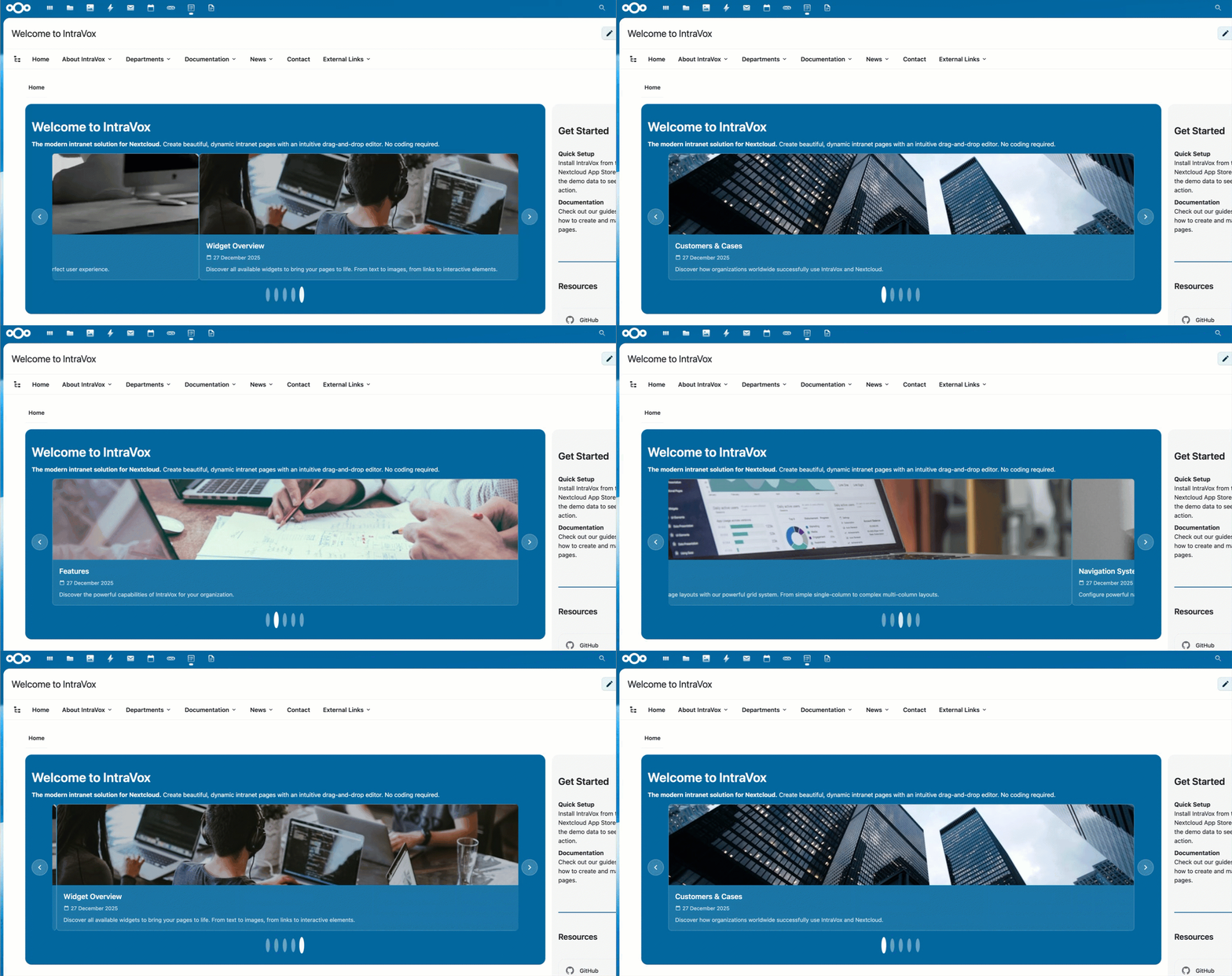
Carousel layout with automatic rotation
The News Widget displays pages from a selected folder as dynamic news items:
- Three Layouts: List, Grid (2-4 columns), or Carousel with autoplay
- MetaVox Filtering: Filter pages by metadata fields (when MetaVox is installed)
- Publication Date Filtering: Schedule content with publish and expiration dates
- Configurable Display: Toggle image, date, and excerpt visibility
- Sorting Options: Sort by date modified or title, ascending or descending
- Source Selection: Pick any folder as content source
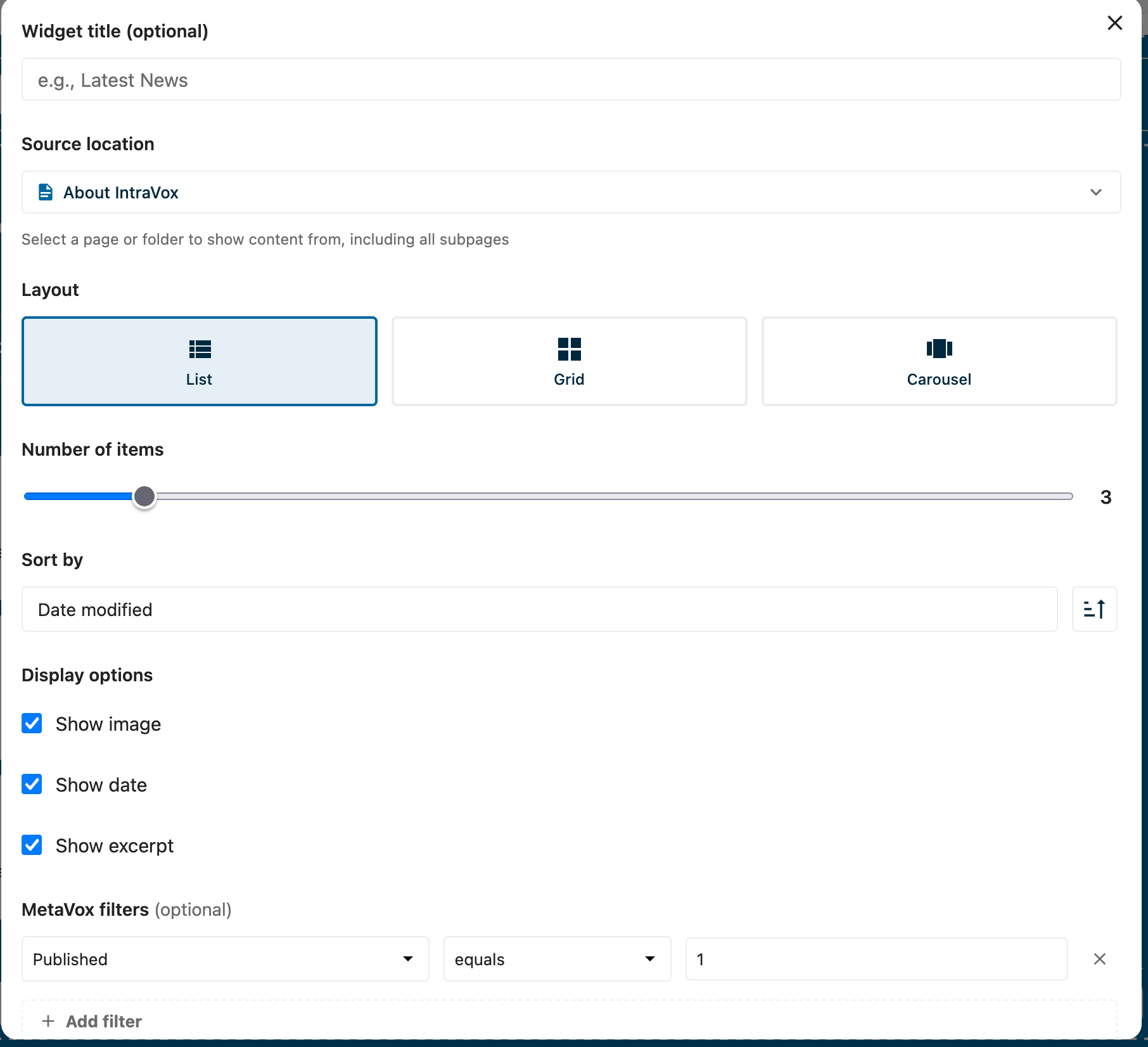
News widget configuration with MetaVox filters
People Widget
The People Widget displays Nextcloud user profiles - perfect for team pages, organization directories, and department overviews:
- Three Layouts: Card (detailed), List (compact), or Grid — all with identical display options
- Selection Modes: Manual selection or filter by attributes
- Group Filtering: Show all users from specific Nextcloud groups
- Field Filtering: Filter by role, department, organisation, or any profile field
- Date Filters: "Is today" and "within next days" operators for birthday widgets
- Birthdate Support: Display birthdates with a cake icon
- Social Links: Twitter/X, Fediverse, and Bluesky profiles
- Customizable Display: Choose which fields to show (avatar, name, email, phone, title, etc.)
- Nextcloud Integration: Click avatars to view profiles, send email, or check availability
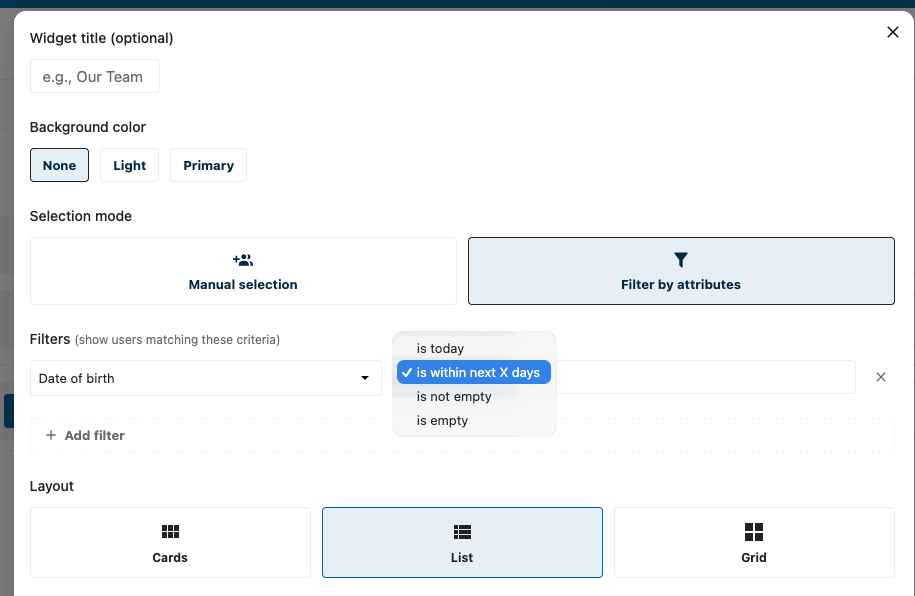
People widget showing birthdate and social links
Calendar Widget
The Calendar Widget displays upcoming events from shared Nextcloud calendars with automatic responsive layout:
- Multi-Calendar Display: Select multiple calendars for a merged view with color-coded date badges
- Responsive Grid: Automatically adapts to 1, 2, or 3 columns based on available space
- Recurring Events: Weekly meetings, monthly reviews, etc. are expanded into individual occurrences
- Clickable Events: Click to open the event in Nextcloud Calendar
- Past & Future: Show events from the past week/month or up to a year ahead
- Background Themes: None, Light, or Primary with automatic text contrast
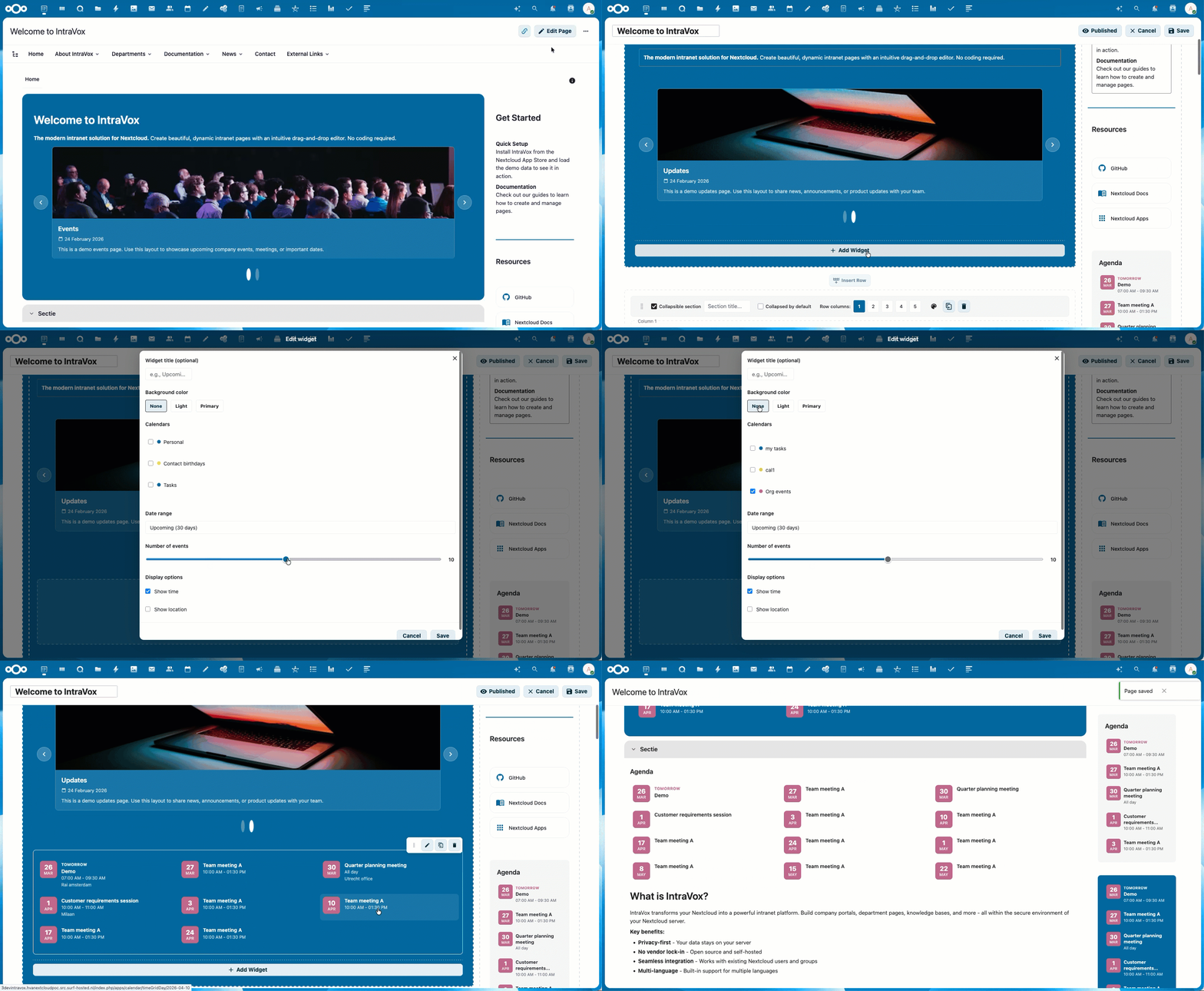
Calendar widget with colored date badges, responsive layout, and background themes
See Calendar Widget documentation for full details.
Collapsible Rows
Create SharePoint-style collapsible sections for better content organization:
- Toggle Sections: Click header to expand/collapse row content
- Custom Titles: Set descriptive titles for each collapsible section
- Default State: Choose whether rows start expanded or collapsed
- Visual Feedback: Clear indicators show expandable content
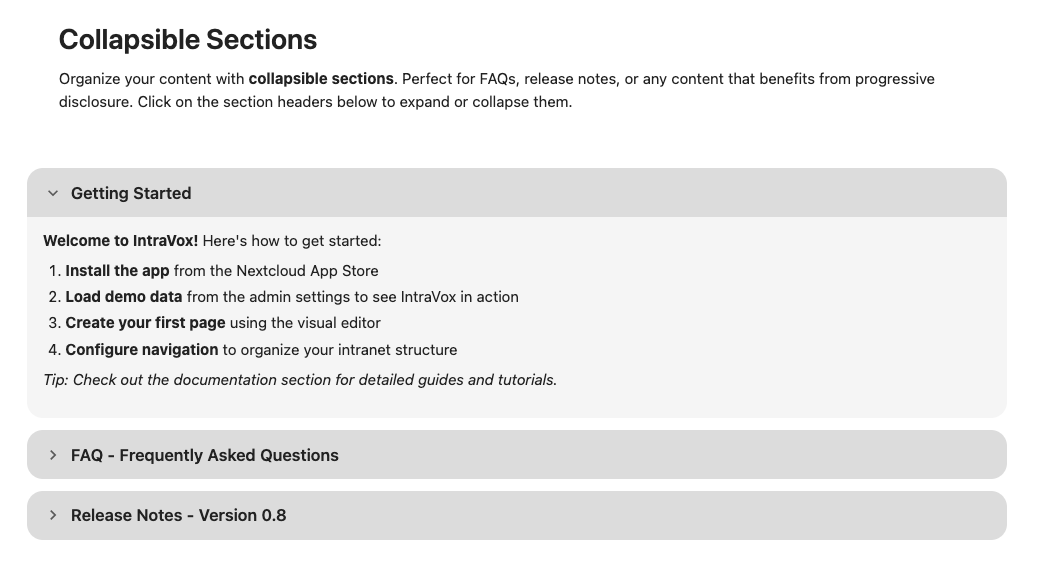
Collapsible rows for organized content sections
Draft & Published Pages
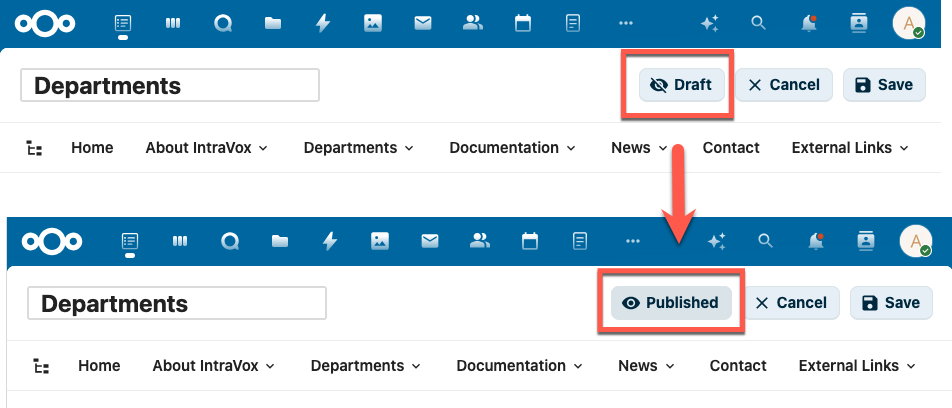
Toggle between Draft and Published in edit mode
Control page visibility with a simple status toggle:
- New pages start as Draft — build your content before making it visible
- Draft pages are only visible to editors (users with write permission)
- Published pages are visible to all users with read access
- Draft pages are hidden from search, RSS feeds, page tree, and public share links
- Click the Draft/Published button in the edit toolbar to toggle
Page Locking
Prevents conflicting edits when multiple editors work on the same site:
- Automatic locking — entering edit mode locks the page for other users
- Lock indicator — other editors see who is editing and since when
- Auto-expiry — locks expire after 15 minutes of inactivity
- Admin override — IntraVox Admins can force-unlock a page
Duplicate Rows
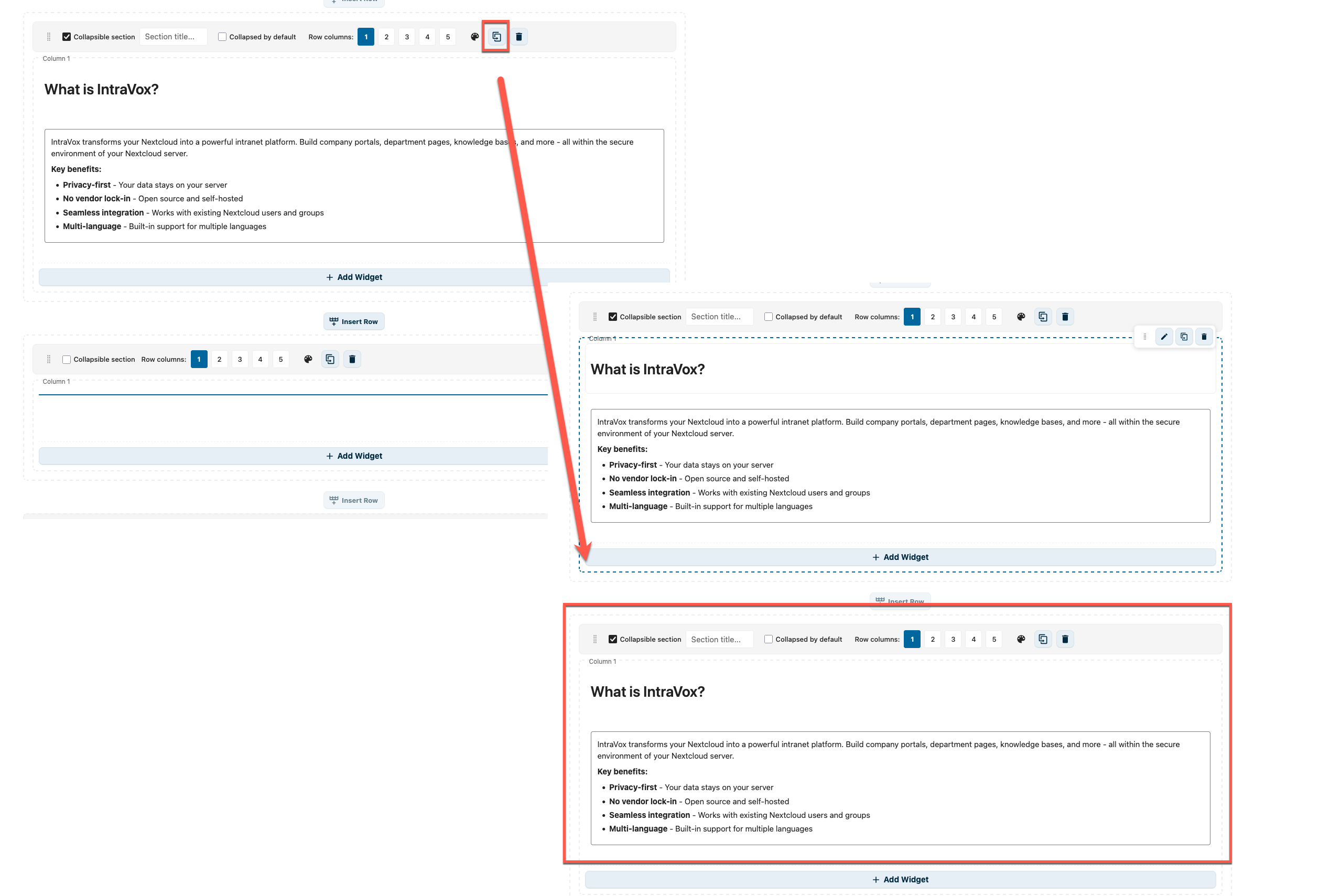
Click the copy icon to duplicate a row with all its widgets
Speed up page building by duplicating rows: click the copy icon in the row controls to create an exact copy of a row including all columns and widgets. Edit the copy independently.
Dummy Text Generator (Easter Egg)
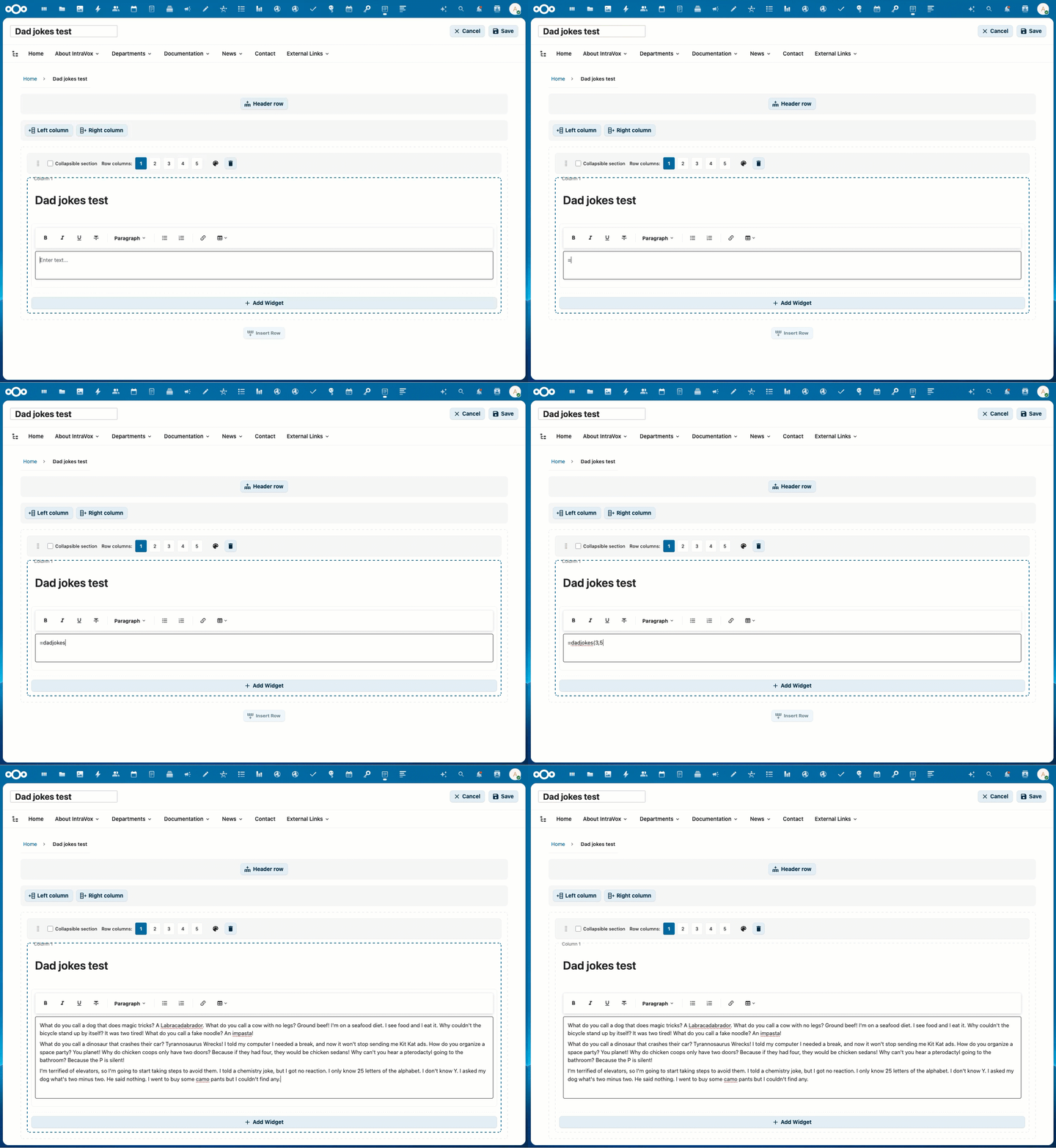
Type =dad() and press Enter to generate placeholder text with dad jokes
Need placeholder text? Type a command in the text widget and press Enter:
| Command | Result |
|---|---|
=dad(3,5) |
3 paragraphs of 5 dad jokes |
=lorem(2,4) |
2 paragraphs of 4 Lorem Ipsum sentences |
Inspired by Microsoft Word's =rand() command. Built-in jokes, no internet required.
Table Support
Full table editing in text widgets:
- Insert tables via the toolbar
- Add/remove rows and columns
- Resize columns by dragging
- Tables saved as Markdown for portability
Navigation
- Customizable Navigation - Build your own navigation structure
- Three Navigation Levels - Support for deep page hierarchies
- Two Display Modes - Choose between dropdown or megamenu style
- External Links - Link to external URLs alongside internal pages
- Page Structure View - Tree view of all accessible pages
- Mobile Menu - Collapsible hamburger menu on mobile devices
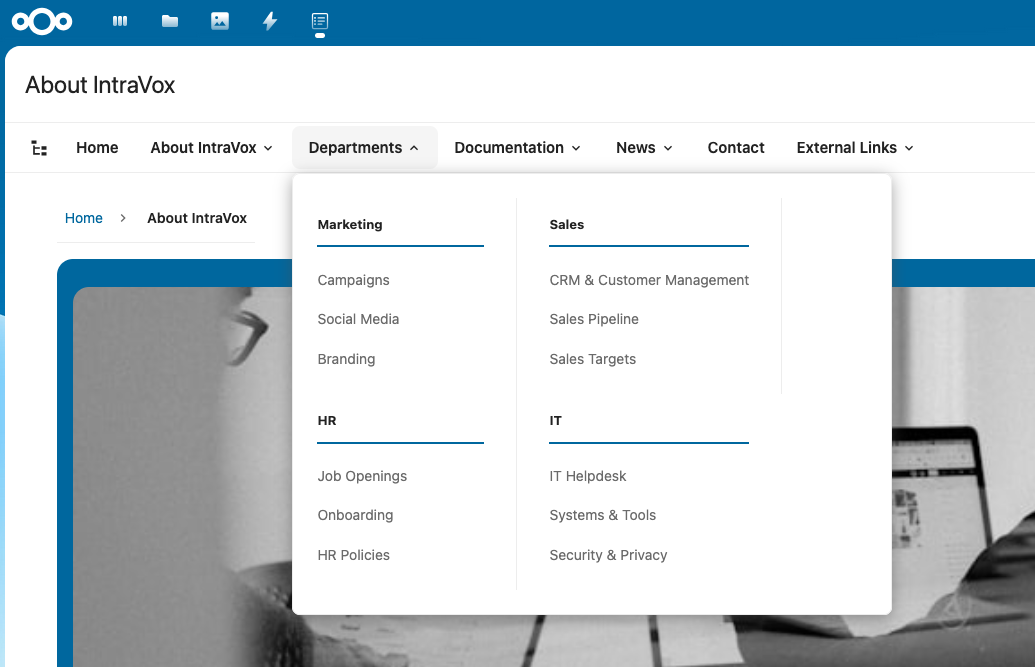
Megamenu navigation with all sections visible
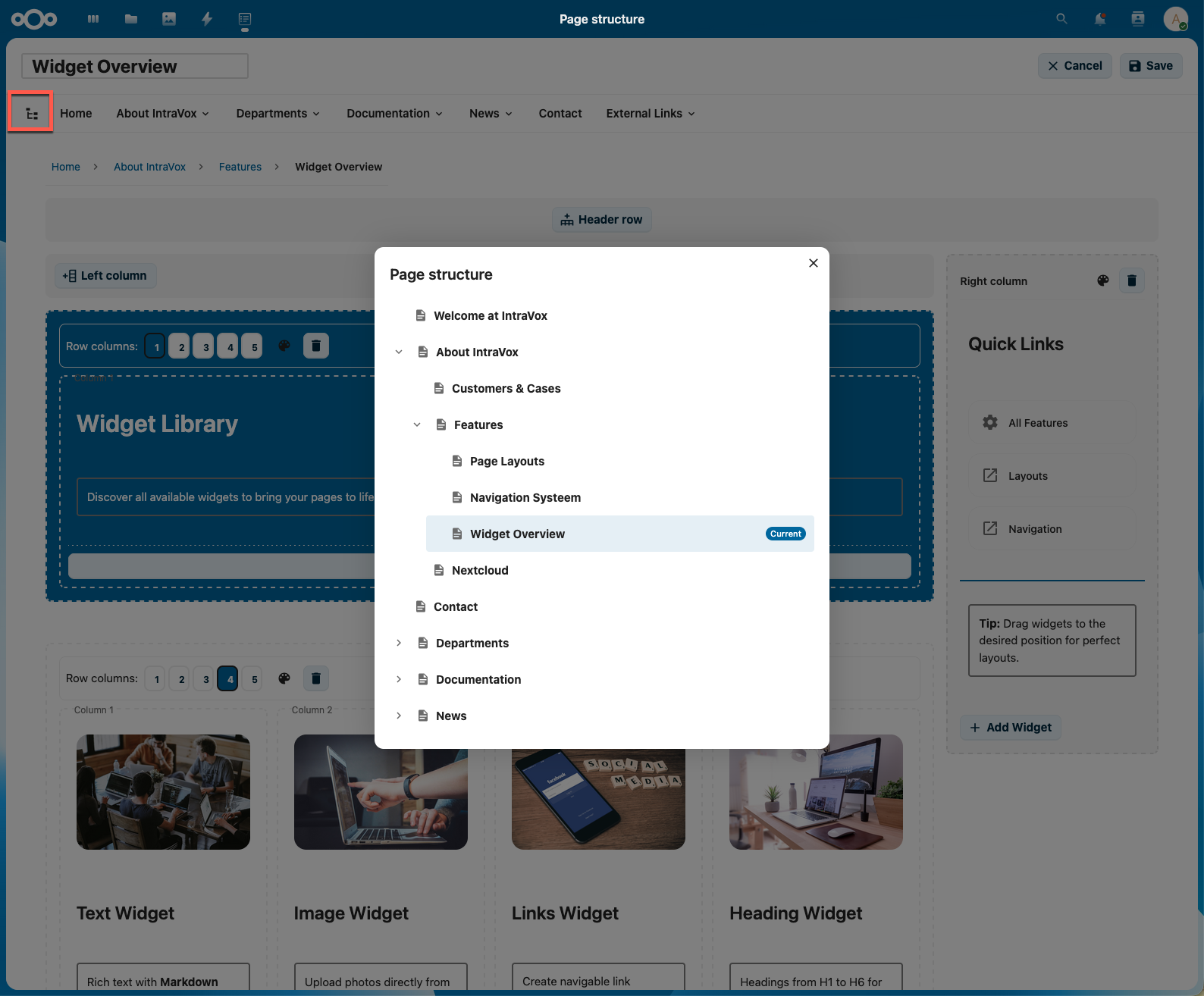
Page structure view for easy content management
Engagement
- Page Reactions - Users can react to pages with emoji (👍❤️🎉😊🤔👀🚀💯 etc.)
- Comments - Full commenting system with threaded replies (1 level deep)
- Comment Reactions - React to individual comments with emoji
- Admin Control - Enable/disable reactions and comments globally
- Page-Level Settings - Override engagement settings per page
Content Organization
- Multi-Language Support - Separate content per language (Dutch, English, German, French)
- Nested Pages - Create pages inside other pages for hierarchical organization
- Footer - Editable footer section on the homepage
- Breadcrumb Navigation - Automatic breadcrumb trail for easy navigation
Security & Permissions
- Nextcloud Native Permissions - Uses GroupFolder ACL for access control
- Folder-Level Permissions - Set different permissions per folder/page
- Permission-Based Filtering - Navigation only shows pages the user can access
- Draft Page Visibility - Draft pages are only visible to users with write permission
- Page Locking - Prevents concurrent edits with automatic expiry and admin override
- Real-Time Permission Checks - Changes take effect immediately
Admin Settings
- Engagement Settings - Enable/disable page reactions, comments, and comment reactions
- Publication Settings - Configure MetaVox date fields for content scheduling
- Video Embed Domains - Configure which video platforms are allowed
- Privacy-First Defaults - YouTube privacy mode and PeerTube enabled by default
- Custom Video Servers - Add your own PeerTube or video hosting domains
- Demo Data Management - Install or reinstall demo content per language
Getting Started
- Welcome Screen - New installations show an onboarding guide with clear next steps
- Quick Setup - Install demo data with one click to see IntraVox in action
- Documentation Links - Direct links to Admin Settings and GitHub documentation
Export & Import
- Full Export - Export entire IntraVox installations to ZIP files
- Confluence Import - Migrate from Atlassian Confluence via HTML export
- MetaVox Integration - Metadata preserved during export/import
- Parent Page Selection - Import into specific locations in your page tree
- Page Hierarchy - Folder structure preserved during export/import
Version History
- Files App Style UI - Version history designed to match Nextcloud Files app
- Current Version Display - Shows real file metadata (modified time, size, author)
- Relative Time - "36 sec. ago", "2 min. ago" formatting like Nextcloud
- Version Preview - Click any version to preview its content before restoring
- One-Click Restore - Restore previous versions with automatic backup
- Version Labels - Add custom labels to mark important versions
- Auto-Refresh - Version list updates automatically when page is saved
- Edit Mode Awareness - Entering edit mode always shows current version being edited
Integration
- Nextcloud Unified Search - Search pages via Ctrl+K with IntraVox app icon
- Nextcloud Comments API - Reactions and comments use native Nextcloud infrastructure
- MetaVox Integration - Add metadata to pages and filter News widgets (when MetaVox is installed)
- Photo Story Widget - Rich photo-album presentation with date + location headers, three visual styles (Magazine / Apple / Travelogue), interactive lightbox, and cross-folder filtering via MetaVox metadata
- Files App Integration - Pages stored as JSON files in GroupFolder
- OpenAPI Documentation - Complete API specification for third-party integration
- OCS API Viewer - Interactive API documentation when OCS API Viewer app is installed
- Responsive Design - Works on desktop, tablet, and mobile
Performance
- Smart Caching - Intelligent cache refresh reduces unnecessary API calls by 50%
- localStorage Persistence - Cache survives browser refresh for instant page loads
- Lazy Loading - Sidebar tabs and data load on-demand
Security
- Nextcloud Authentication - All pages require Nextcloud login
- GroupFolder Permissions - Native ACL-based access control
- Path Traversal Protection - Enhanced path sanitization
- ZIP Slip Prevention - Secure ZIP extraction with path validation
- SVG Sanitization - Uploaded SVG files are sanitized to prevent XSS
- Secure Temp Files - Cryptographically secure filenames with restrictive permissions
Demo Content
IntraVox includes demo content to help you get started quickly. Install demo data directly from the Admin Settings panel.
Installing Demo Data
- Go to Nextcloud Admin Settings → IntraVox
- Choose a language (Nederlands, English, Deutsch, Français)
- Click Install to set up demo content
The demo pages showcase:
- Different page layouts (single column, multi-column, side columns)
- Various widget types (text, headings, images, videos, links, dividers)
- Clickable images linking to pages and external URLs
- Embedded video examples from different platforms
- Navigation structure examples
- Department page organization
- Row background color options
Reinstalling Demo Data
If you want to reset demo content to its original state:
- Go to Admin Settings → IntraVox
- Click Reinstall next to the language
- Confirm the action (this will delete all existing demo content for that language)
Note
: The demo content is fictional and intended only to demonstrate IntraVox's capabilities. Replace it with your organization's actual content.
Use Cases
- Company Intranets - Digital workplace with news, resources, and team information
- Knowledge Bases - Documentation that's easy to navigate and maintain
- Team Wikis - Collaborative knowledge sharing
- Project Hubs - Centralized project information and resources
- Department Portals - Dedicated spaces for teams to share information
System Requirements
| Component | Minimum | Recommended |
|---|---|---|
| Nextcloud | 32-33 | 33+ |
| PHP | 8.2+ | 8.3+ |
| PHP memory_limit | 256MB | 512MB |
| GroupFolders app | Required | Required |
⚠️ Important: The default PHP memory_limit of 128MB is insufficient for IntraVox. Demo data installation requires at least 256MB. Update your
php.iniif needed.
Optional companion apps
| App | Purpose | Required for |
|---|---|---|
| MetaVox | Custom metadata fields on GroupFolders | Photo Story cross-folder filtering, News widget MetaVox filters, people/subjects/custom-location overlays. Optional — Photo Story works with just NC core FilesMetadata. |
| Recognize | On-device face + object recognition | Photo Story people/subjects metadata via MetaVox (only used if MetaVox is also installed) |
| camerarawpreviews | Thumbnails for RAW formats (CR2 / NEF / ARW / DNG / etc.) | Photo Story thumbnails for RAW files. Without it RAW tiles fall back to a styled placeholder. Install via occ app:install camerarawpreviews. |
| previewgenerator | Pre-generates thumbnails in the background | Fast Photo Story loading on large folders. Strongly recommended for folders > 200 photos. Install via occ app:install previewgenerator. |
Performance recommendations
For Photo Story widgets pointing at folders with hundreds or thousands of photos:
-
Pre-generate thumbnails with the
previewgeneratorapp:# One-time, run after a big import (can take hours on 100k+ photos): occ preview:generate-all # Then schedule via system cron (or systemd timer) for incremental updates: */15 * * * * www-data php /var/www/html/occ preview:pre-generateWithout this, RAW thumbnails are generated on first view (~1s per file). With it: cached, ~10ms.
-
Enable a Redis cache in Nextcloud's
config.php:'memcache.distributed' => '\OC\Memcache\Redis', 'memcache.locking' => '\OC\Memcache\Redis',Photo Story uses
OCP\ICacheFactoryto memoize per-folder timeline + highlights computations. Repeat page-loads drop from ~500ms to ~10ms. -
EXIF data sources (Photo Story) — Photo Story reads photo EXIF from two sources, in this order:
-
Nextcloud core FilesMetadata (NC 28+). NC's own scanner indexes every uploaded photo into
oc_files_metadatawith well-known keys (photos-original_date_time,photos-gps,photos-ifd0,photos-size). This is the primary source — no app-specific field-name mapping needed.Trigger a full scan once after installation or large bulk imports:
occ files:scan --allSchedule incremental scans via NC's built-in cron. The scanner picks up new uploads automatically.
-
MetaVox custom fields (optional). MetaVox adds people, subjects, custom location-string, custom country labels — things NC core doesn't track. Photo Story uses these in addition to NC core data. If you want these enrichments, use the Python toolset in
Hetzner/scripts/metavox-exif/in this repository. It writes to MetaVox via the OCS API and is designed to run from a server-side cron job.
You don't need MetaVox for the core experience. NC core alone gives you date, GPS, camera, and image dimensions for every scanned photo.
-
-
Tune EXIF behavior via app config:
# Default: skip per-file EXIF extraction in the API request (sparse rows, fastest).
# The lightbox lazily fetches EXIF per opened photo via /photo-story/photo-exif.
occ config:app:set intravox photostory.exif.eager_in_request --value="no"

# Emergency fallback for folders without MetaVox backfill: eagerly extract EXIF.
# Slower; capped at N files per request to avoid timeouts on large folders.
occ config:app:set intravox photostory.exif.eager_in_request --value="yes"
occ config:app:set intravox photostory.exif.eager_cap --value="200"
Production setups should use the MetaVox backfill (#3 above) instead of eager EXIF.
-
Tune reverse-geocoding (place-name resolution):
# Default: enabled, caps new fetches at 20/request to avoid Nominatim rate-limit bans.
occ config:app:set intravox photostory.geocode.max_new_per_request --value="20"

# Use a self-hosted Nominatim if you have one:
occ config:app:set intravox photostory.geocode.endpoint --value="https://your-nominatim.example/reverse"
Photo Story: map provider
IntraVox does not bundle a map tile server. By default Photo Story uses OpenStreetMap's public tile server (https://tile.openstreetmap.org/{z}/{x}/{y}.png), which is fine for personal and small-team use but is rate-limited under OSM's Tile Usage Policy for heavier deployments.
Options for production:
-
Stick with OSM for personal or low-traffic intranets. No configuration needed.
-
Use your own tile server (PMTiles, MapTiler, Stadia Maps, etc.) by setting:
occ config:app:set intravox photostory.tiles.url --value="https://tiles.example.com/{z}/{x}/{y}.png" occ config:app:set intravox photostory.tiles.attribution --value="© Your provider" occ config:app:set intravox photostory.tiles.max_zoom --value="19" -
Disable map features entirely (privacy mode — no external network requests):
occ config:app:set intravox photostory.map.enabled --value="no"This disables all
Show map/Show daily mini-maptoggles globally; users get a "Disabled by administrator" hint in the editor.
Self-hosting PMTiles is a recommended option for production. See Protomaps for setup instructions — a NL extract is ~250 MB and can be served as a static file from any HTTP server.
Installation
- Install the GroupFolders app from Nextcloud App Store
- Install IntraVox from Nextcloud App Store
- Go to Admin Settings → IntraVox and install demo data for your preferred language
- The
IntraVoxGroupFolder and permission groups are created automatically - Assign users to the IntraVox groups or configure custom access via GroupFolder ACL
Fresh Installation: On a new Nextcloud instance, simply install IntraVox and click "Install" for any demo language. The GroupFolder, groups, and permissions are set up automatically.
Configuration
Permission Groups
IntraVox uses Nextcloud's GroupFolder permissions. Recommended group structure:
| Group | Permissions | Description |
|---|---|---|
| IntraVox Admins | Full access | Edit navigation, manage all content |
| IntraVox Editors | Read + Write + Create | Create and edit pages |
| IntraVox Users | Read only | View content only |
Folder Structure
IntraVox/
├── en/                          # English content
│   ├── home.json               # Homepage
│   ├── navigation.json         # Navigation configuration
│   ├── footer.json             # Footer content
│   ├── _resources/             # Shared media library (images, videos, SVG)
│   ├── news/                   # News articles folder
│   │   ├── article1/
│   │   │   ├── article1.json   # Article content
│   │   │   └── _media/         # Article-specific media
│   │   └── article2/
│   └── about/                  # Page folder
│       ├── about.json          # Page content
│       └── _media/             # Page-specific media
├── nl/                          # Dutch content
│   └── ...
├── de/                          # German content
│   └── ...
└── fr/                          # French content
    └── ...
Media Management
- Page Media (
_media/): Images and videos specific to a single page - Shared Library (
_resources/): Reusable media across all pages in a language - Supported Formats: JPEG, PNG, GIF, WebP, SVG (sanitized), MP4, WebM, OGG
Technical Details
Technology Stack
| Component | Technology |
|---|---|
| Frontend | Vue.js 3, Nextcloud Vue components |
| Backend | PHP 8.x, Nextcloud AppFramework |
| Storage | Nextcloud GroupFolders (JSON files) |
| Authorization | Nextcloud native permissions + ACL |
| Build | Webpack, npm |
Page Storage Format
Pages are stored as JSON files with the following structure:
{
    "uniqueId": "page-uuid-v4",
    "title": "Page Title",
    "language": "en",
    "layout": {
        "columns": 1,
        "rows": [...],
        "headerRow": {...},
        "sideColumns": {...}
    }
}
API Endpoints
IntraVox provides a complete REST API documented with OpenAPI 3.1. Install the OCS API Viewer app for interactive documentation.
| Method | Endpoint | Description |
|---|---|---|
| GET | /api/pages |
List all accessible pages |
| GET | /api/pages/tree |
Get page tree structure |
| GET | /api/pages/{id} |
Get page content |
| POST | /api/pages |
Create new page |
| PUT | /api/pages/{id} |
Update page |
| DELETE | /api/pages/{id} |
Delete page |
| GET | /api/pages/{id}/breadcrumb |
Get breadcrumb navigation |
| GET | /api/pages/{id}/versions |
Get page version history |
| POST | /api/pages/{id}/versions/{timestamp} |
Restore a version |
| GET | /api/pages/{id}/media/list |
List page media files |
| POST | /api/pages/{id}/media |
Upload media file |
| GET | /api/navigation |
Get navigation structure |
| POST | /api/navigation |
Save navigation |
| GET | /api/footer |
Get footer content |
| POST | /api/footer |
Save footer |
| GET | /api/news |
Get news items with filtering |
| GET | /api/pages/{id}/comments |
Get comments for a page |
| POST | /api/pages/{id}/comments |
Add a comment |
| GET | /api/pages/{id}/reactions |
Get page reactions |
| POST | /api/pages/{id}/reactions/{emoji} |
Add page reaction |
| GET | /api/settings/engagement |
Get engagement settings |
| GET | /api/settings/publication |
Get publication settings |
| GET | /api/metavox/status |
Check MetaVox availability |
| GET | /api/metavox/fields |
Get MetaVox field definitions |
| GET | /api/search |
Search pages |
| GET | /api/export/languages |
Get exportable languages |
| GET | /api/export/language/{lang} |
Export language content |
| POST | /api/import/zip |
Import ZIP archive |
For complete API documentation, see the openapi.json file or use OCS API Viewer.
Development
Building from Source
# Install dependencies
npm install

# Development build with watch
npm run dev

# Production build
npm run build
Deployment
# Deploy to server
./deploy.sh
Documentation
Start here: Documentation Index — full table of contents organized by audience (users, admins, features, architects).
Quick links:
- Getting Started - Per-role quickstart
- Accessibility - WCAG 2.1 AA compliance and accessibility features
- Editor Guide - How to create and edit pages, widgets, and content
- Authorization Guide - User and administrator permissions guide
- Scenarios - Practical recipes for approval workflows, department intranets, and more
- Architecture - Technical architecture documentation
- News Widget Guide - How to use the News widget
- People Widget Guide - How to use the People widget
- Export/Import Guide - Export and import content
- Engagement User Guide - How to use reactions and comments
- Engagement Admin Guide - Configure engagement settings
- Engagement Architecture - Technical engagement details
- API Documentation - OpenAPI 3.1 specification
Troubleshooting
"Could not find resource intravox/js/intravox-main.js to load"
This error typically occurs after updating IntraVox and is caused by Nextcloud's resource cache not being refreshed. To fix it, run one of the following commands on your server:
# Option 1: Run maintenance repair (recommended)
sudo -u www-data php occ maintenance:repair

# Option 2: Disable and re-enable the app
sudo -u www-data php occ app:disable intravox
sudo -u www-data php occ app:enable intravox
After running either command, refresh your browser (Ctrl+F5) to clear the browser cache.
License
AGPL-3.0
Author
Rik Dekker - Shalution
Acknowledgments
Built with:
- Nextcloud - Open-source content collaboration platform
- Vue.js - Progressive JavaScript framework
- SortableJS - Drag-and-drop functionality
- TipTap - Rich text editor