- Shell 60.2%
- PHP 12.7%
- JavaScript 9.3%
- CSS 8.9%
- Python 7.8%
- Other 1.1%
| .github | ||
| bin | ||
| build | ||
| etc | ||
| i18n | ||
| ncp-app | ||
| ncp-web | ||
| staged_rollouts | ||
| tests | ||
| updates | ||
| .dockerignore | ||
| .gitignore | ||
| changelog.md | ||
| CONTRIBUTING.md | ||
| FUNDING.yml | ||
| generate_cohortes.sh | ||
| install.sh | ||
| lamp.sh | ||
| ncp.sh | ||
| post-inst.sh | ||
| README.md | ||
| run_update_history.sh | ||
| tag_and_push.sh | ||
| update.sh | ||

English | Traditional Chinese 繁體中文 | Simplified Chinese 简体中文
(The translated README pages are not updated at this time)
NextcloudPi





This is the build code for the NextcloudPi open-source community project.
NextcloudPi is a ready to use image for Virtual Machines, Raspberry Pi, Odroid HC1, Rock64 and other boards. (⇒ Downloads)
This code also generates the NextcloudPi LXD and LXC containers and there is an install script for the latest supported Debian based system as well.
Find the documentation at docs.nextcloudpi.com, the documentation is all written by volunteers.
Please reach out in the Matrix or Telegram Wiki group chats if you want to help out to keep them up-to-date and we'll add you to the Wiki Group on the forum.
Test Status
master

devel

Features
- Raspberry Pi OS/Debian 12 (Bookworm)
- Nextcloud
- Apache, with HTTP2 enabled
- PHP 8.1
- MariaDB
- Redis memory cache
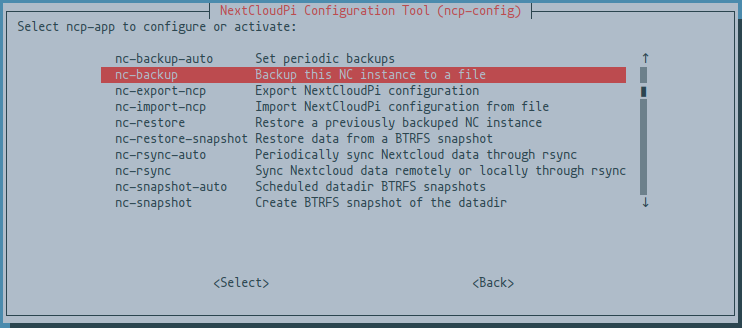
- ncp-config TUI for easy setup ( RAM logs, USB drive and more )
- Automatic redirection to HTTPS
- APCu PHP cache
- PHP Zend OPcache enabled with file cache
- HSTS
- Cron jobs for Nextcloud
- Sane configuration defaults
- Full emoji support
- Postfix email
- Secure
Extras
- Setup wizard
- NextcloudPi Web Panel
- Wi-Fi ready
- Ram logs
- Automatic security updates, activated by default.
- Let’s Encrypt for trusted HTTPS certificates.
- Fail2Ban protection against brute force attacks.
- UFW firewall
- Dynamic DNS support for no-ip.org
- Dynamic DNS support for freeDNS
- Dynamic DNS support for duckDNS
- Dynamic DNS support for spDYN
- Dynamic DNS support for Namecheap
- dnsmasq DNS server with DNS cache
- ModSecurity Web Application Firewall
- NFS ready to mount your files over LAN
- SAMBA ready to share your files with Windows/Mac/Linux
- USB automount
- Remote updates
- Automatic NCP updates
- Automatic Nextcloud updates
- Update notifications
- Nextcloud backup and restore
- Nextcloud online installation
- Format USB drive to BTRFS
- BTRFS snapshots
- Automatic BTRFS snapshots
- BTRFS snapshot auto sync
- scheduled rsync
- UPnP automatic port forwarding
- Security audits with Lynis and Debsecan
- ZRAM
- SMART hard drive health monitoring
Extras can be activated and configured using the web interface at HTTPS port 4443

Or from the command line using
sudo ncp-config
Docker has been discontinued
Docker has been discontinued for the time being, please read the announcement here: https://help.nextcloud.com/t/nextcloudpi-planning-to-discontinue-its-docker-version-with-nc-25/158895
Run in LXD
# Imports the LXC image, replace the X's with version number
lxc image import "NextcloudPi_LXD_vX.XX.X.tar.gz" --alias "nextcloudpi"

# Launches a container from the image
lxc launch "nextcloudpi" ncp

# Starts the container you've launched from the imported image
lxc start ncp
Run in Proxmox
There are two ways to run NCP on Proxmox:
1. Using the official release image
In your Proxmox web interface, head to any storage pool that has CT Templates enabled, go to CT Templates, click "Download from URL" and enter the link to the latest LXC image from the Nextcloudpi releases page and press "Download".
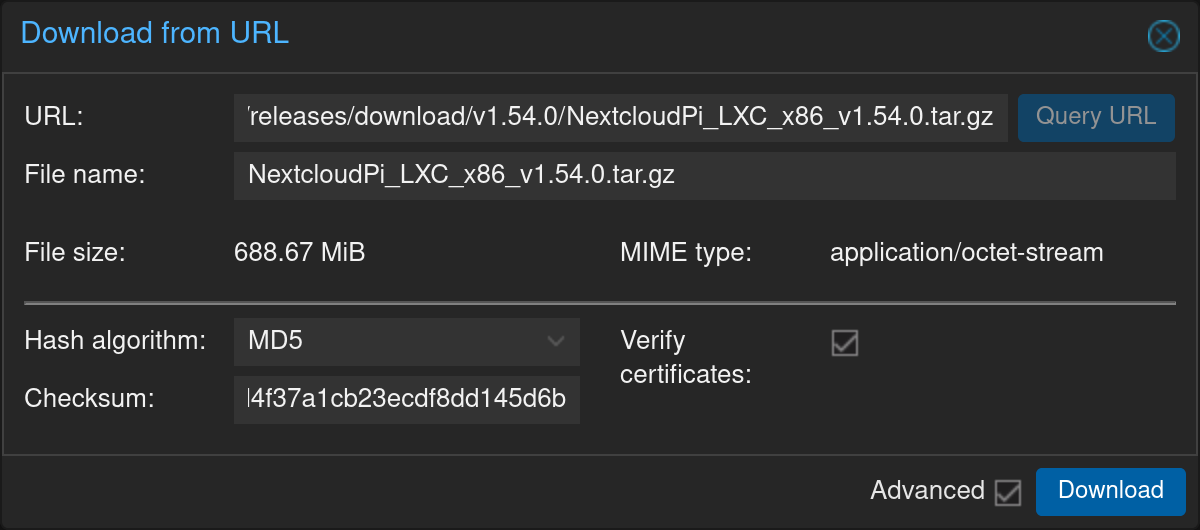
Optionally, you can copy the corresponding md5 sum from the releases page and paste it in the "Checksum" field to have Proxmox check that the downloaded image was not corrupted
2. Installer by community-scripts (formerly tteck)
Use the install script from community-scripts to install the LXC container on your Proxmox instance
community-scripts has multiple helper scripts available for Proxmox on their website, go have a look if you're using Proxmox. 👍
Installation: bash -c "$(curl -fsSL https://raw.githubusercontent.com/community-scripts/ProxmoxVE/main/ct/nextcloudpi.sh)"
Default Settings: 2GB RAM - 8GB Storage - 2vCPU
(Check their website if this has changed and we haven't had the time to update it here yet, it's located under: Operating-Systems > NextcloudPi LXC)
Thank you to the community-scripts organisation ❤️ for making the helper script & letting us use this for Proxmox installations 🙏
You can find the GitHub repository with the helper scripts here: here.
How to build
Packages
apt-utilsapt-transport-httpsbuild-essentialbinfmt-supportbinutilsbzip2ca-certificateschrootcroncurldialoglsb-releasejqgitpsmiscprocpswgetwhiptailqemuqemu-user-static
Raspberry Pi IMG
git clone https://github.com/nextcloud/nextcloudpi.git
cd nextcloudpi
./build/build-SD-rpi.sh
Armbian-based board
./build-SD-armbian.sh odroidxu4 # supported board code name
LXD
./build/build-LXD.sh
NextcloudPi can be installed in any architecture running the latest Debian
Note: this assumes a clean Debian install, and there is no rollback method
Curl install scripts
This is executed as root as indicated by the #
# curl -sSL https://raw.githubusercontent.com/nextcloud/nextcloudpi/master/install.sh | bash
If you're not root you can run it with sudo like so
curl -sSL https://raw.githubusercontent.com/nextcloud/nextcloudpi/master/install.sh | sudo bash
Links
(Use the Forum for Support questions please, there's a NCP tag available, it will bridge your post to the Matrix and Telegram chats)